
Introduction
Every UC administrator has a set of reports that they often commonly as an part of interaction with the business. These templates are generally CDR reports for metrics such as call volume, agent login/logouts, caller queue time, and more. When we set up Variphy we tend to immediately move to configure these reports and anything else is an after thought. But once you’ve met the immediate needs of the business, you can take the time to look at how Variphy can help you manage your phone system from an administrative role.
Many times I have gone into a Cisco Unified Communications Manager that is new to me and learned of dozens, hundreds, or even thousands of devices that have been configured in the system, and then abandoned. Whether it be a phone that broke 3 years ago and was RMA’d for a new one, or the Jabber device for an employee who left the company 6 months ago, these configurations do not automatically delete themselves, and often times the CUCM administrator is not notified that these devices have been abandoned.
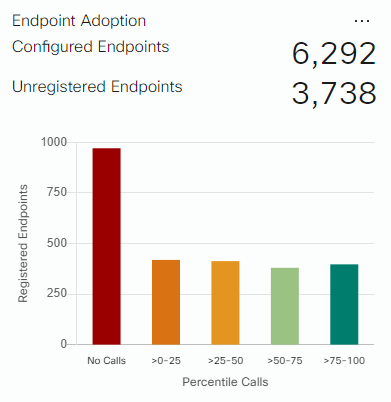
This CUCM has 6,292 configured endpoints with 3,738 of them unregistered!!! What are you doing? Chart from WebEx Connected UC which shows the numbers but gives no report option.
Why This Is A Problem
Each device in CUCM takes up a device license. This is especially true for devices not assigned to an active end user account. Device licenses cost $$$. Many times I’ve seen systems administrators ready to buy more licensing when all they really needed was a licensing audit.
You may be asking at this point: “How do I identify these abandoned phones without going through my thousands and thousands of devices and auditing each one for usage?”
What To Do About It
The answer is with Variphy and the report templates found in their knowledge base for dormant physical and soft phones! These reports, along with other reports found available for download, can help you quickly identify abandoned devices and extensions in CUCM.
Just download the report you need, import it into your Variphy application, and run it! Too easy!

Jaron Davis
Unified Communications Architect specializing in enterprise Zoom, Microsoft Teams, Cisco UC modernization, SIP/VoIP infrastructure, and systems architecture.